**Tags:** #software_testing/handigheidjes #software_testing/tools
Bron: [How to Automatically fill a form](https://dev.to/clement_grosieux/how-to-automatically-fill-a-form-speed-up-your-development-5cep)
Kopie van bron:
> # How to Automatically Fill a Form: Speed up Your Development 💪
>
> [Clément Grosieux](https://dev.to/clement_grosieux) 14 Jun 2023
>
> 
>
> You're probably tired of wasting time filling out a form every time you make a code change, right?
>
> Let's imagine you have a form that you're currently developing, and every time you refresh the page... you're forced to fill it all over again.
>
> So, I'm going to introduce you to Chrome DevTools snippets (this DevTools is available on almost all browsers except Safari and Firefox). It allows you to fill out a long form with just a few clicks.
> ## Accessing the Snippets:
> Access Chrome DevTools (right-click -> inspect or use the shortcut).
> Once there, go to the Sources tab. If it's not displayed, click on the arrow that I've circled in red.
> [](https://res.cloudinary.com/practicaldev/image/fetch/s--HNLtvEzE--/c_limit%2Cf_auto%2Cfl_progressive%2Cq_auto%2Cw_800/https://dev-to-uploads.s3.amazonaws.com/uploads/articles/rc4vp933wc1tvgl1ipj3.png)
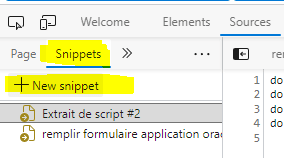
> Click on the Snippets tab and then "New snippet."
> [](https://res.cloudinary.com/practicaldev/image/fetch/s--cZa4R5J2--/c_limit%2Cf_auto%2Cfl_progressive%2Cq_auto%2Cw_800/https://dev-to-uploads.s3.amazonaws.com/uploads/articles/rmzznv1ahdhzmcgloyas.png)
>
> This will open a blank JavaScript code page for you.
> ## Practical Example
> Let's consider the following form:
>
> ```
> <form>
> <h1>Form :</h1>
> <label for="input-1">Input 1 :</label>
> <input type="text" id="input-1" name="input-1" placeholder="enter value" required>
>
> <label for="input-2">Input 2 :</label>
> <input type="text" id="input-2" name="input-2" placeholder="enter value" required>
>
> <label for="input-3">Input 3 :</label>
> <input type="text" id="input-3" name="input-3" placeholder="enter value" required>
>
> <label for="select">Select :</label>
> <select id="select" name="sekect">
> <option value="">Select Choice</option>
> <option value="choice-1">Choice 1</option>
> <option value="choice-2">Choice 2</option>
> </select>
>
> <button type="submit">Submit</button>
> </form>
> ```
>
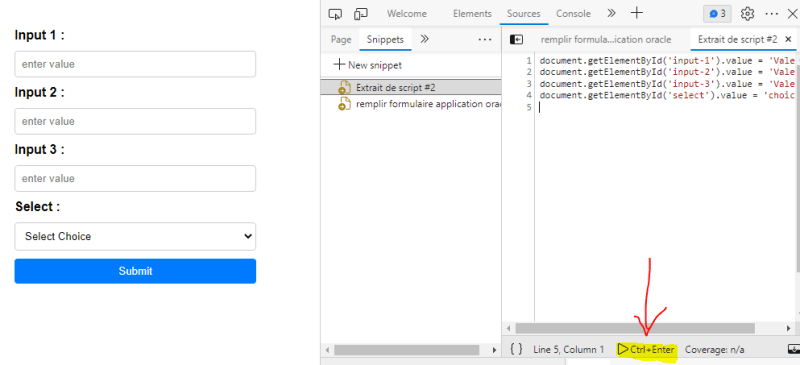
> To fill it out, you simply need to set the input values in JavaScript:
>
> ```
> document.getElementById('input-1').value = 'Valeur 1';
> document.getElementById('input-2').value = 'Valeur 2';
> document.getElementById('input-3').value = 'Valeur 3';
> document.getElementById('select').value = 'choice-2';
> ```
>
> That's it! You just need to either press Ctrl+Enter or click the button.
>
> [](https://res.cloudinary.com/practicaldev/image/fetch/s--eOinHqeg--/c_limit%2Cf_auto%2Cfl_progressive%2Cq_auto%2Cw_800/https://dev-to-uploads.s3.amazonaws.com/uploads/articles/f0ummlflyk8wr5fdnwna.png)
> ## Conclusion
> Now you know how to quickly fill out a form using the DevTools snippets!
> Of course, snippets can be used in much more complex ways. It's up to you to explore and imagine your own uses.
> Feel free to comment if you have any questions, follow me, or react to the article with an reaction 😊